How I skip the boring part using skills in Microsoft Copilot Cowork
Built a Copilot Cowork skill that turns natural language into consistent Mermaid diagrams.
In my role at IT RBLS, I have to create a lot of diagrams. I built this Skill because I got tired of rewriting Mermaid sequence diagrams by hand. They are useful for explaining integrations, APIs, Power Platform flows, and system interactions, but they get messy fast: inconsistent naming, random arrows, unclear system boundaries, and too much visual noise.
Copilot could already generate diagrams, but the output still needed cleanup. So instead of repeating the same prompt instructions every time, I turned my diagram rules into a reusable Skill for Microsoft Copilot Cowork. One job, one standard: generate Mermaid sequence diagrams from natural language, but with a fixed structure I can actually use in documentation.
What the skill does?
A Skill is basically a reusable instruction set that teaches Cowork how to handle a specific task in a consistent way. This Skill takes a natural language description of an interaction between people, systems, or services and turns that into a Mermaid sequence diagram.
That output is ready to use in Markdown-based environments that support Mermaid, which makes it practical for places like GitHub, Notion, Teams, Azure DevOps, or other documentation tooling.
What makes the Skill useful is not just that it produces Mermaid syntax. Plenty of tools can do that. The real value is that it applies a set of rules every time, so the diagram is not just generated, but generated in a way that stays aligned with how I want these diagrams to look and behave. For example, the Skill is designed to:
- always start with numbered interactions
- separate humans from systems
- group systems into clearly named boxes
- use consistent request and response arrows
- avoid visual clutter like activation bars
- keep labels short and easy to scan
- support loops and conditional structures in a clean way
That means I am not just asking Copilot Cowork to create a diagram. I am asking it to apply a documentation standard.
The first version
The first version started with something very practical: a diagram I had already created for one of my customers. I didn’t start with a blank prompt. I used a real example that already had the structure, level of detail, and Mermaid style I wanted. That made it much easier to explain what “good” looked like.
I asked Cowork to create a Skill that could generate Mermaid sequence diagrams like that example. The prompt was roughly this:
Create a Skill that generates Mermaid sequence diagrams based on this example. Keep the same structure, style, and conventions. The output should be valid Mermaid code and ready to paste into Markdown.
With some tweaks it gave me the first version of the Skill.
1
2
3
4
5
6
7
8
9
10
11
12
13
14
15
16
17
18
19
20
21
22
23
24
25
26
27
28
29
30
31
32
33
34
35
36
37
38
39
40
41
42
43
44
45
46
47
48
49
50
51
52
53
54
55
56
57
58
59
60
61
62
63
64
65
66
67
68
69
70
71
72
73
74
75
76
77
78
79
80
81
82
83
84
85
86
87
88
89
90
91
92
93
94
95
96
97
98
99
100
101
102
103
104
105
106
107
108
109
110
111
112
113
114
115
116
117
118
119
120
121
122
123
124
125
126
127
128
129
130
131
132
133
134
135
136
137
138
139
140
141
142
143
144
145
146
147
148
149
150
151
152
153
154
155
156
157
158
159
160
161
162
163
164
165
166
167
168
169
170
171
172
173
174
175
176
177
178
179
180
181
182
183
184
185
186
187
188
189
190
191
192
193
194
195
196
197
198
199
200
201
202
203
204
205
206
207
208
209
210
211
212
213
214
215
216
217
218
219
220
221
222
223
224
225
226
227
228
229
230
231
232
233
234
235
236
237
238
239
240
241
242
243
244
245
246
247
248
249
250
251
252
253
254
255
---
name: Mermaid Sequence Diagram v2.0
description: |
  Creates Mermaid sequence diagrams from natural language descriptions of
  interactions between people, systems, or services. Outputs a valid
  ```mermaid``` code block inline — ready to paste into Teams, GitHub, Notion,
  Azure DevOps, Confluence, or any Markdown renderer that supports Mermaid.

  Use when the user asks to "create a sequence diagram", "draw a sequence
  diagram", "make a mermaid diagram of [interaction]", "visualize this flow as
  a sequence diagram", "diagram the interaction between X and Y", or describes
  a step-by-step flow between actors/systems.
---

# Mermaid Sequence Diagram — House Style

All diagrams produced by this skill must follow the conventions below so they
share a consistent look and feel across projects.

## Non-negotiable house rules

1. **Always start with `autonumber`** so every message is numbered (1, 2, 3…).
2. **Group participants into `box "<System or Landscape>"` blocks.** Every
   participant belongs to a named system group — never leave a participant
   ungrouped. Humans stay OUTSIDE any box.
3. **Use `actor` for humans, `participant` for systems/services/apps.**
   Humans sit on the far left. Mermaid automatically repeats actors at the
   bottom of tall diagrams.
4. **Never use activation bars.** Do NOT emit `activate` or `deactivate`
   directives. The default Mermaid renderer draws these as thick gray
   rectangles on the lifelines, which is not part of the house style.
   Lifelines should remain plain vertical lines.
5. **Requests are solid (`->>`), replies are dashed (`-->>`).** Failures use
   `-x` only when explicitly described by the user.
6. **Short imperative messages in the user's working language.** Examples:
   `Read record`, `Write file`, `Storage confirmation`.
   No full sentences, no trailing punctuation.
7. **Loops use descriptive bracket labels** after the keyword:
   `loop [Per <item>]`, `loop [Per <batch>]`, `loop [<Phase> processing]`.
8. **Alt/opt/par blocks follow the same bracket-label convention**:
   `alt [success]` / `else [error]` / `end`.
9. **Do not add `Note` elements unless the user explicitly asks.** The house
   style keeps diagrams clean; notes add visual noise.
10. **No theming directives, no custom CSS, no `%%{init}%%` blocks.** Rely on
    the default Mermaid theme so the diagram renders identically everywhere.
11. Do NOT use for flowcharts, class diagrams, state diagrams, ER diagrams,
    or Gantt charts — those are different Mermaid diagram types.

## Canonical template

mermaid
sequenceDiagram
    autonumber
    actor U as <Human>

    box "<System Group A>"
        participant A1 as <Component>
        participant A2 as <Component>
    end

    box "<System Group B>"
        participant B1 as <Component>
        participant B2 as <Component>
    end

    U->>A1: <verb object>
    loop [<Per ...>]
        A1->>A2: <verb object>
        A2-->>A1: <reply>
    end
    A1-->>U: <reply>

## Naming conventions

- **Box labels** are always wrapped in double quotes and describe the system
  *landscape* or *platform* (e.g., `"Frontend"`, `"Integration Layer"`,
  `"Backend Landscape"`).
- **Participant aliases** are short (1–3 letters). Display names use the
  real product/component name (`participant WF as Workflow Service`).
- **Actor alias** is typically the role (`actor U as User`).

## Output rules

1. Output a single fenced ` ```mermaid ` code block.
2. Precede the code block with a one-line description of what it shows.
3. After the code block, ask (in one short sentence) whether to adjust
   actors, add error paths, or split into smaller diagrams.
4. Do not render images — source only.
5. Do not invent steps, actors, or systems the user did not describe. If the
   description is missing a needed participant or outcome, ask first.
6. **Never carry over participants, actor roles, box names, or messages from
   the worked example below.** The example is a style reference only. Every
   name, label, and message in your output must come from the user's request.

## Process steps (required)

Every run of this skill MUST externalize its work as tasks via `TaskCreate`
so the end user sees live progress in the task panel while the diagram is
produced. Do not work silently.

Create the following tasks at the very start of every run, in this order:

1. **Interpret the description** — parse the user's input; list the
   detected actors, systems, groups, messages, and loop/alt/opt/par blocks.
2. **Validate the input with the user** — resolve gaps and
   ambiguities via `AskUserQuestion` (see the next section). Only mark
   `completed` when no open questions remain and the outline is confirmed.
3. **Define participants and groups** — finalize the actor(s), `box`
   groupings, and short participant aliases.
4. **Draft the message flow** — draft the ordered messages,
   loop/alt blocks, and arrow types (solid request, dashed reply).
5. **Check against the house-style checklist** — run the checklist at the
   bottom of this file before emitting output.
6. **Deliver the diagram** — produce the final `mermaid` code block
   and the one-line follow-up question.

Rules:
- Use `TaskUpdate` to set each step `in_progress` when starting and
  `completed` when done. Never batch updates at the end of the run.
- Task descriptions MUST be in the user's working language (English by
  default for this user) and use outcome-oriented business language — no
  tool names, no script paths.
- For trivially short requests (one actor, one system, ≤3 messages) the
  six tasks are still created, but each can be completed quickly.

## Input validation (required)

Always validate the input with the end user **before** drafting the
`mermaid` block. Ask clarifying questions with `AskUserQuestion` — never
as plain text. Batch related questions into a single call to minimize
round-trips.

Validate at minimum:
1. **Actors** — Is every human role named? One initiator or multiple?
2. **Systems & groups** — Is every system named, and does every system
   belong to a named `box` landscape/platform?
3. **Ambiguous references** — "the system", "the backend", "the API" must
   be resolved to a concrete name before drafting.
4. **Flow completeness** — Does every request have a reply, or is it
   explicitly fire-and-forget? Are loop boundaries and iteration labels
   clear?
5. **Error paths** — Success-only, or also failure branches
   (`alt [success]` / `else [error]`)?
6. **Scope & size** — If the flow exceeds ~15 numbered steps, confirm
   whether to split into multiple diagrams.
7. **Working language** — Confirm the message language if not obvious
   from the request (default: English for this user).

After gathering the answers, present a concise **outline preview**
(actors + boxes + numbered step summary) and ask the user to confirm or
adjust before emitting the final `mermaid` code block. Do not skip this
confirmation, even when the input appears complete.

If the user cancels an `AskUserQuestion` (empty answers), stop and ask
briefly what they'd like to do instead — do not re-ask the same question.

## Clarification triggers

Ask the user first when:
- Participants are ambiguous ("the system" — which system?).
- It is unclear which system group each participant belongs to.
- The described content is really a flowchart (decisions without actors) —
  offer a flowchart instead.
- The flow has more than ~15 numbered steps — offer to split into multiple
  diagrams (e.g., one per loop block).

## Worked example — STYLE REFERENCE ONLY

**CRITICAL: This example exists only to demonstrate the visual style and
structural conventions (boxes, autonumber, loop labels, arrow types). You
must NEVER reuse its participants, actor roles, box names, or message text
in diagrams you generate for the user.**

When a user asks for a diagram, draw ONLY from what they describe. The
placeholder names below (`Frontend`, `Integration Layer`, `Backend`, etc.) are
intentionally generic — none of them may appear in your output unless the
user explicitly mentions them. Treat the example like a wireframe: copy
the skeleton, not the labels.

Scenario (purely illustrative, fully generic): A user submits a record
through a web app. The record is persisted in a database, then a workflow
service pushes the payload to an integration API which stores files on a
shared location. Finally, a batch job picks up the files and imports them
into a backend system.

mermaid
sequenceDiagram
    autonumber
    actor U as User

    box "Frontend"
        participant WA as Web App
        participant DB as Database
        participant WF as Workflow Service
    end

    box "Integration Layer"
        participant IA as Integration API
        participant IS as Integration Store
    end

    box "Backend"
        participant FS as File Share
        participant BJ as Batch Job
        participant BE as Backend System
    end

    loop [Per submitted record]
        U->>WA: Submit record
        WA->>DB: Save record
        WA->>DB: Save attachments
        DB-->>WA: Save confirmation
    end

    loop [Per attachment processing]
        WF->>DB: Read attachment
        DB-->>WF: Attachment data
        WF->>IA: Write attachment
        IA->>IS: Process storage request
        IS->>FS: Store attachment
        FS-->>IS: OK
        IS-->>IA: Storage confirmation
        IA-->>WF: OK
    end

    loop [Per export batch]
        WF->>DB: Read records
        DB-->>WF: Record data
        WF->>WF: Generate export file
        WF->>IA: Place export file
        IA->>IS: Process export request
        IS->>FS: Store file
        FS-->>IS: OK
        IS-->>IA: Storage confirmation
        IA-->>WF: OK
    end

    loop [Batch import processing]
        BJ->>FS: Read files
        FS-->>BJ: OK
        BJ->>BE: Process batch
        BE-->>BJ: Processing successful
    end

## Checklist (apply before responding)

- [ ] First line is `sequenceDiagram`, second line is `autonumber`.
- [ ] Every system participant is inside a `box "..."` block.
- [ ] Every human is an `actor` outside any box.
- [ ] No `activate` / `deactivate` directives anywhere (no activation bars).
- [ ] Every loop/alt/opt/par has a `[bracket label]`.
- [ ] No `Note`, no theming, no custom CSS.
- [ ] Messages are short imperative phrases, no trailing punctuation.
- [ ] All six process tasks created and updated live via `TaskCreate`/`TaskUpdate`.
- [ ] Input validated with `AskUserQuestion` and outline confirmed by the user.
The first result was already useful, but not perfect.
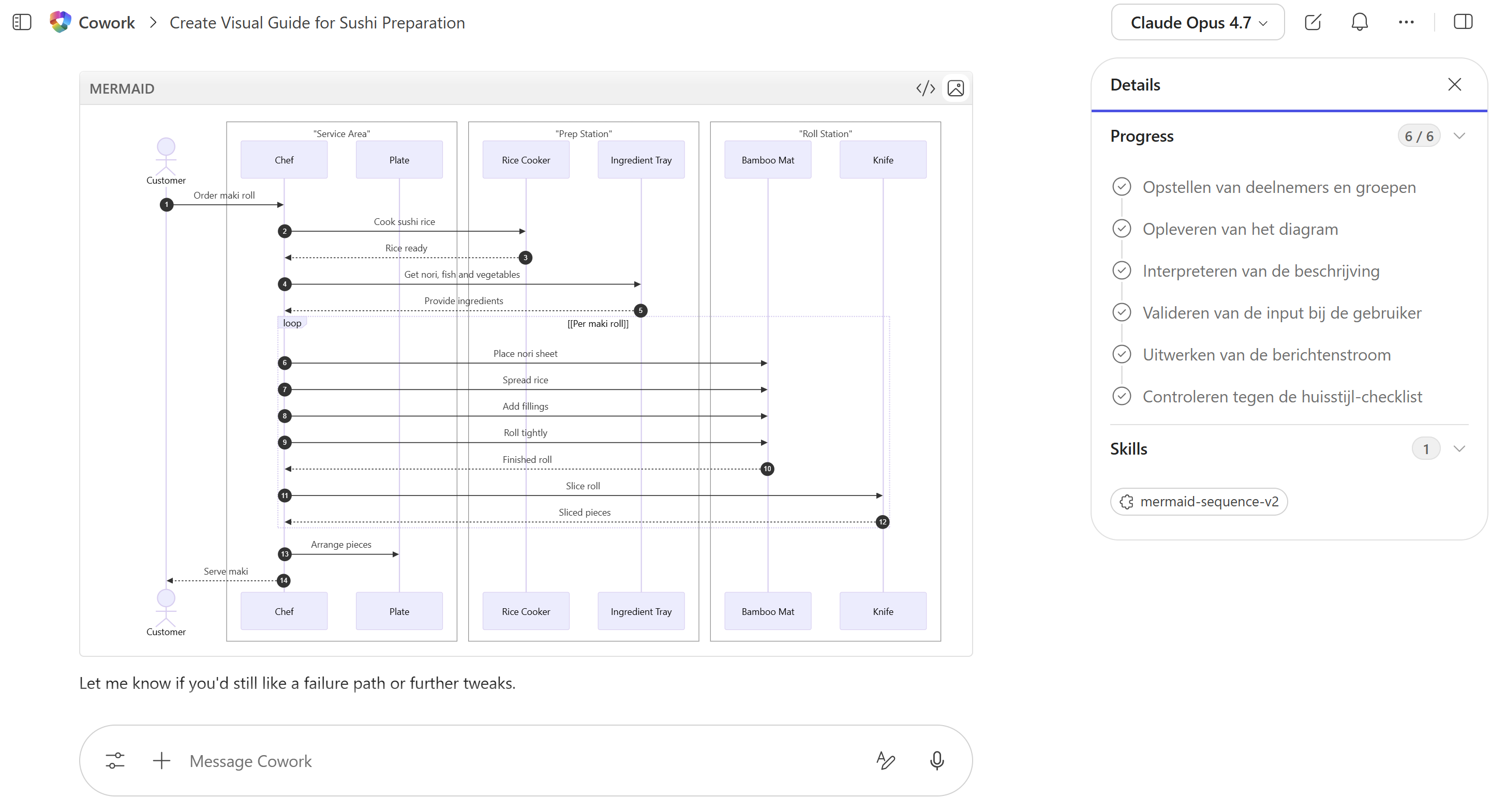 First diagram illustrating for making Sushi
It understood the direction. It created Mermaid. It followed some of the structure. But it still needed sharper rules around naming, system grouping, loops, replies, and what not to include. That was expected. The first version wasn’t the final product. It was the starting point.
I was not the first
While building this, I found a GitHub repository from Cathryn Lavery who had already created her own diagram Skill setup. And honestly, it worked insanely well. Her version already covered most of what I needed solid structure, clear conventions, consistent output and the use of 14 different diagrams.
I walked through the detailed setup guide in the repo to get everything wired up correctly. I made the necessary tweaks for my own design preferences and Mermaid conventions, but for now I actually stuck closer to her version than my original one. Simply because it already had everything I needed. Here i used it to create a diagram to visualize the hierarchy of the Microsoft Power Platform.
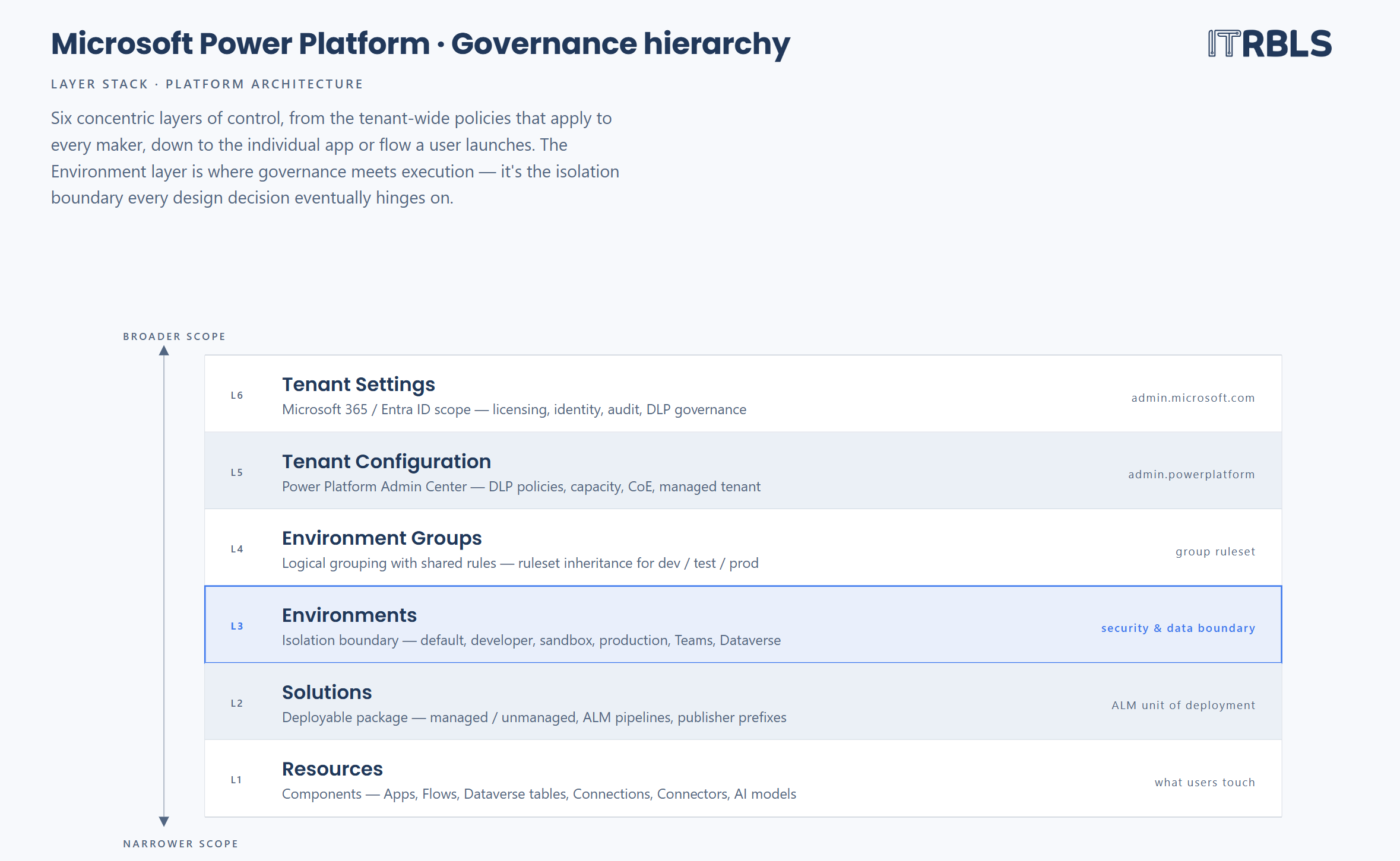 Power Platform diagram
That was the moment it clicked for me that Skills become much more powerful once you stop thinking about them as prompts and start treating them like reusable tooling. Seeing how someone else structured instructions also gave me a lot of ideas for improving future versions.
That is one of the things I currently like most about Copilot community. People are experimenting openly, sharing ideas, and improving each other’s work in public.